
Part 1 – Part 2 – Part 3 – Part 4 – Part 5 – Part 6 – Part 7
I plan to get my Microsoft Technology Associate certificate in Python programming and figured I’d take my notes publicly as I prepare. Call it learning in public or review notes or whatever – I’m just interested in passing on my first attempt.
My aim is to review the topics I already know and cover topics I might have missed. I will link resources as opportunities arise. There will be lots of code examples provided, if for no other reason than to prove to myself that things work the way I expect.
I’m certainly interested in corrections if I have something blatantly wrong. However, the point of these posts isn’t to go super deep on each topic or act as a tutorial, but rather to act as a broad overview review of the topics (with perhaps some deeper dives where necessary) for this exam. I think it’s safe to say that if you don’t understand the code examples I provide here, you should review the corresponding topic in the Python documentation and other deep-dive tutorials.
Today I’m reviewing the following topics identified by Microsoft as being on the Python MTA exam:
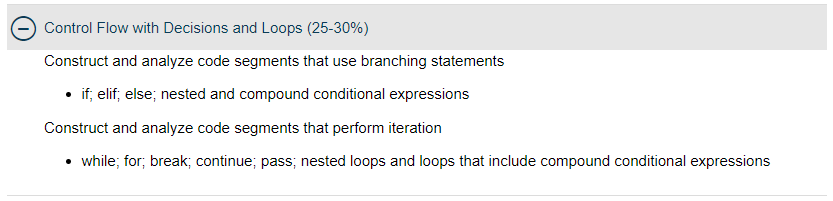
The good news is that I’m comfortable with all of these keywords and how they’re used.
Construct and analyze code segments that use branching statements
if, elif, and else
These are the basic decision-makers of computer programming: do one thing if something is true, else do another thing if (elif) some other thing is true, add any number of elif statements as you want, and then if none of those if or elif statements were true, use the else as a catch-all. Both elif and else statements are optional.
num = 5
if num < 5:
    print("Number is less than five!")
elif num > 5:
    print("Number is greater than five!")
else:
    print("Number is five!")
Nested and compound conditional expressions
We can combine these statements along with operators previously discussed to do some more complex operations. Here is an example of nested statements I borrowed from this article on the subject:
num = float(input("Enter a number: "))
if num >= 0:
    if num == 0:
        print("Zero")
    else:
        print("Positive number")
else:
    print("Negative number")
This could have been done with an if/elif/else pattern in fewer lines of code, yes, but I borrowed it because I was struggling to come up with a simple but logical example myself, so I can hardly point fingers for questionable code snippets.
A compound conditional can include several checks in a single conditional statement:
if dollars > 50 and (status == "payday" or status == "birthday"):
    print("Treat yo'self!")
These are pretty basic topics that doubtless will be placed into highly complex chains of conditional expressions, I’m guessing asking me to predict the output. It seems doable.
Construct and analyze code segments that perform iteration
while
A while loop checks for a condition and executes until that condition is no longer true. This loop will continue to ask the user for a word until the user enters exactly “word”:
word = "sword"
while word != "word":
    word = input("enter a word: ")
while loops are also useful for performing a task a certain number of times and keeping a count (albeit this is often better executed with a for loop, covered next). This loop prints the integers 1 through 5, one per line:
count = 0
while count < 5:
    count += 1
    print(count)

output
1
2
3
4
5
for
for loops are a great way to iterate through a collection and are dead simple to use compared to other programming languages.
fruits = ["apple", "banana", "cherry", "dragonfruit", "elderberry"]
for fruit in fruits:
    print(fruit, end=" ")

output
apple banana cherry dragonfruit elderberry
That’s incredibly cool and easy.
What if one needed to iterate through a list of numbers? The range function is super useful here. Like with slicing operations, the first specified number is inclusive, but the second specified number is not included:
for num in range(1,6):
    print(num, end=" ")

output
1 2 3 4 5
Sometimes one might need to have access to both the index of the item and the item itself. This is easy to do with the enumerate function:
fruits = ["apple", "banana", "cherry", "dragonfruit", "elderberry"]
for index, fruit in enumerate(fruits):
    print(f"{index+1}. {fruit.title()}")

output
1. Apple
2. Banana
3. Cherry
4. Dragonfruit
5. Elderberry
How about iterating through two different lists of the same size? for loops have it handled with the zip function:
fruits = ["apple", "banana", "cherry", "dragonfruit", "elderberry"]
veggies = ["avocado", "beets", "cucumbers", "daikon", "eggplants"]
for fruit, veggie in zip(fruits, veggies):
    print(f"{veggie.title()} vs. {fruit.title()}")

output
Avocado vs. Apple
Beets vs. Banana
Cucumbers vs. Cherry
Daikon vs. Dragonfruit
Eggplants vs. Elderberry
Finally, for loops can be used to iterate through the keys and values of a dictionary:
disney_villains = {
    "Aladdin" : "Jafar",
    "Hercules" : "Hades",
    "The Little Mermaid" : "Ursula",
    "The Lion King" : "Scar"
}
for movie, villain in disney_villains.items():
    print(f"{movie}: {villain}")

output
Aladdin: Jafar
Hercules: Hades
The Little Mermaid: Ursula
The Lion King: Scar
We can similarly loop through just the keys using the .keys() method:
for key in disney_villains.keys():
    print(key, end=" ")

output
Aladdin Hercules The Little Mermaid The Lion King
Or through just the values using the .values() method:
for value in disney_villains.values():
    print(value, end=" ")

output
Jafar Hades Ursula Scar
Remember that dictionaries are unordered, so if order matters in these iterations through dictionaries, you’ll probably want to convert first to an ordered dictionary, which can be done by using a built-in module in Python (but Microsoft doesn’t mention it so it doesn’t seem worth getting into here!).
break
The break keyword stops the execution of the current for or while loop and is virtually always used in combination with a conditional statement (docs mention a few edge cases).
We’re going to return here to the while loop and a frequent design pattern that combines it with the break keyword. This code will keep prompting the user until the proper response is given:
while True:
    response = input("Hello there\n")
    if response == "General Kenobi":
        break

output
Hello there
hey
Hello there
hi
Hello there
hello?
Hello there
General Kenobi
>>>
continue
I use the continue keyword on a fairly regular basis, but I’m not sure I’ve ever looked at the docs for it. Before I do, I’ll describe what I think it does: when you’re in a for loop, you might encounter a condition that wants you to stop that particular iteration of the loop but not actually break the loop. Using continue pushes you directly to the next item of the for loop.
The docs show I have this pretty much spot on, except it can also be used in while loops. Good to know!
The following program defines all the reasons one particular character hates sand, then continually loops and asks the user to recount them. It continues to loop until the user has recounted all the reasons one might hate sand. Note that the line printing “That’s all the reasons!” doesn’t execute until the conditional with the continue statement fails.
reasons_to_hate_sand = [
        "it's rough",
        "it's coarse",
        "it's irritating",
        "it gets everywhere"
]
reasons_given = []
while True:
    reason = input("What is a reason one might hate sand?\n")
    if reason in reasons_to_hate_sand:
        reasons_given.append(reason)
        if reasons_to_hate_sand != reasons_given:
            continue
        print("That's all the reasons!")
        break
    else:
        print("Nope, not a good enough reason. Try again.")

output
What is a reason one might hate sand?
it's rough
What is a reason one might hate sand?
it's coarse
What is a reason one might hate sand?
it's irritating
What is a reason one might hate sand?
it's sandy
Nope, not a good enough reason. Try again.
What is a reason one might hate sand?
it gets everywhere
That's all the reasons!
>>>
pass
I use the pass keyword in two distinct places in my code:
1) As a placeholder in an indented segment so that I can save or execute in-progress code without an error:
def working_function():
    print("I am working here!")
def function_to_do():
    pass
2) In a try/except clause (to be covered in a later post in this prep series) where I don’t really have anything I want to do to handle an error except skip it and keep going. Note that this example is pretty simple and not really good practice for a number of reasons:
try:
    age = int(input("What's your age?\n"))
    # let's pretend that it doesn't really matter if we get this or not!
    print(age)
except:
    pass

output
What's your age?
900
900

What's your age?
when nine-hundred years old you reach, look as good you will not
Note that there is no output in the second example, but that no error is thrown either.
nested loops and loops that include compound conditional expressions
A really common design pattern is nested for loops. These are often useful for iterating through items in a list of lists.
characters = [
    ["Luke", "Leia", "Han"],
    ["Vader", "Tarkin", "Palpatine"],
    ["Fett", "Hutt", "Yoda"]
]
for group in characters:
    for character in group:
        print(character)

output
Luke
Leia
Han
Vader
Tarkin
Palpatine
Fett
Hutt
Yoda
We’ve covered compound conditional expressions and all kinds of loop strategies, but let’s see if we can close this post out with a nice example combining these:
trilogy_characters = {
    "Original Trilogy" : ["Luke", "Leia", "Han", "Vader", "Yoda"],
    "Prequels" : ["Anakin", "Padme", "Qui-Gon", "Obi-Wan", "Jar-Jar"],
    "Sequels" : ["Rey", "Finn", "Poe", "BB-8", "Rose"]
}
like_counts = trilogy_characters.copy()

for trilogy, characters in trilogy_characters.items():
    liked_characters = 0
    for character in characters:
        response = int(input(
            f'Enter "1" if you like this character or "2" if not.\n'
            f'{character}: '
        ))
        if response is 1:
            liked_characters += 1
        elif response is 2:
            print(f"What?! Who doesn't like the great {character.upper()}?")
    like_counts[trilogy] = liked_characters

print("Here are the number of characters you like from each trilogy:")
for trilogy, count in like_counts.items():
    print(f"{trilogy}: {count}")
print(f"You clearly like the {max(like_counts, key=like_counts.get)} best!")

output
Enter "1" if you like this character or "2" if not.
Luke: 1
Enter "1" if you like this character or "2" if not.
Leia: 1
Enter "1" if you like this character or "2" if not.
Han: 1
Enter "1" if you like this character or "2" if not.
Vader: 1
Enter "1" if you like this character or "2" if not.
Yoda: 1
Enter "1" if you like this character or "2" if not.
Anakin: 1
Enter "1" if you like this character or "2" if not.
Padme: 1
Enter "1" if you like this character or "2" if not.
Qui-Gon: 1
Enter "1" if you like this character or "2" if not.
Obi-Wan: 1
Enter "1" if you like this character or "2" if not.
Jar-Jar: 2
What?! Who doesn't like the great JAR-JAR?
Enter "1" if you like this character or "2" if not.
Rey: 1
Enter "1" if you like this character or "2" if not.
Finn: 1
Enter "1" if you like this character or "2" if not.
Poe: 1
Enter "1" if you like this character or "2" if not.
BB-8: 1
Enter "1" if you like this character or "2" if not.
Rose: 2
What?! Who doesn't like the great ROSE?
Here are the number of characters you like from each trilogy:
Original Trilogy: 5
Prequels: 4
Sequels: 4
You clearly like the Original Trilogy best!
There aren’t any compound conditional expressions in there now that I look at it, but I think this is fine for off the cuff.
Part three is coming soon. The topic: performing input and output operations.